Teach the agent
Teach your agent something new!
Start a new Claude Code session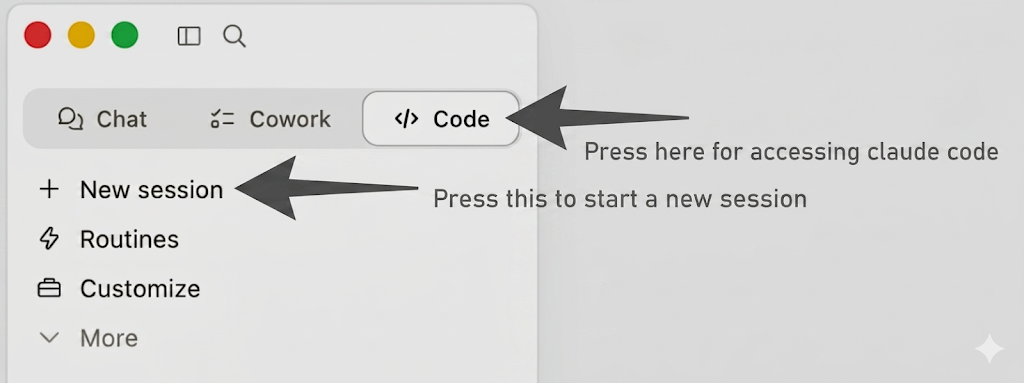 .
.
First: Download prosus_management_overview.md and drag it into the chat.
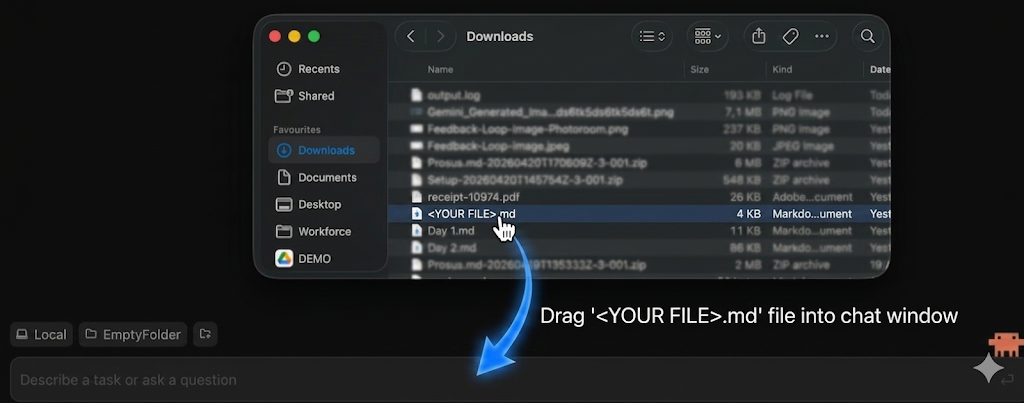
Open your Downloads folderDownloads folderWhere your browser saves files when you click a download link — the exact location depends on your operating system. and drag it into the Claude Code chat window.
Prompt:
Create a presentation about prosus_management_overview.md (just 4 slides)
use pptxgenjs for creating the slides
Prompt follow-up:
Same conversation!
Add logo on the top right:
https://www.prosus.com/~/media/Images/P/prosus-corp-v2/logo/logo.png
Add styling like:
https://www.prosus.com/stylesheets/global.css?revision=e1710112-c1ed-4afb-8f3a-51389ef9dbf4
Take over the colors, fonts, and vibe.
Prompt follow-up #2:
Same conversation!
Turn everything you learned into a skill called:
"create-prosus-presentation"
Make sure this skill is always called when creating a presentation so we
have a uniform company brand.
We can now re-run the first prompt after removing the existing presentation from the folder and see that we can now "one-shot" the presentation in Prosus styling.
You just taught Claude something about Prosus ;)
Expected output
SkillSkillA reusable bundle of know-how that Claude loads on demand. Lives as a folder of markdown on your machine; kicks in when the conversation matches what the skill is for. created at ~/.claude/skills/create-prosus-presentation/ and verified — it's now appearing in the available-skills list and the bundled template builds successfully.
Structure:
SKILL.md— pushy description that triggers on any deck/slides/pptx/presentation task, with inline brand rulesassets/template.js— ready-to-copy pptxgenjs starter withaddTitleBar,addFooter,addLogo,addCardhelpers and 4 sample slidesassets/prosus_logo.png— official logoreferences/brand.md— extended palette, typography scale, motifs, things to avoid
Fall back
Download the pre-built skill bundle here.
Next time you build a presentation it looks like Prosus!
Stuck?Debrief — what should have happened
A skill was created at ~/.claude/skills/create-prosus-presentation/ with this rough structure:
SKILL.md— a pushy description that triggers on any deck/slides/pptx/presentation task, with inline brand rules.assets/template.js— a ready-to-copypptxgenjsstarter with helpers likeaddTitleBar,addFooter,addLogo,addCard, and four sample slides.assets/prosus_logo.png— the official logo.references/brand.md— extended palette, typography scale, motifs, and "things to avoid".
The punchline: same model, radically different output — from a markdown file you just wrote yourself.
If your skill doesn't appear in /skills, restart Claude Code fully (not just close the window). Skills only refresh on restart.
Stuck?FAQ for this exercise
Q: How do I download prosus_management_overview.md? Clicking it just opens in another tab. A: Open the file, then on the left side there's a File menu — press Download. It goes to Documents/Downloads. Then drag it into Claude Code.
Q: Claude says the Google Drive connectorConnectorSmall bridges that let Claude reach into your other apps — Gmail, Calendar, Drive, Slack, Linear, Notion — with your explicit permission. isn't authenticated, but I already authenticated it. A: Prosus IT shut down the Drive connector from Claude. Download the file manually, then drop it in. You don't need the connector for this exercise.
Q: If I create a skill, what's the scope? If I make a "process-presentation" skill, does everything have to look like a Prosus presentation, or can I have different scopes? A: Three scopes:
- Project scope — only available in that specific folder. Recommended when you're starting to experiment.
- Global scope — available in every Claude sessionSessionA single ongoing conversation with Claude Code. Every message, every file Claude has read, every tool result lives inside one session — stored locally on your machine.. Good for "always make presentations this way".
- Plugin — toggle on/off per conversation, downloaded from somewhere. Best if Prosus wants to distribute org-wide skills.
It's important to put when the skill should be used in the description — that helps Claude both store it correctly and decide when to call it.
Q: How does Claude know when to use a skill? A: Type /context in Claude — you'll see a portion of the contextContextEverything Claude can see right now — the conversation so far, the files it has read, the tool results, the system instructions. A big text buffer the model reads end-to-end before every reply. window allocated to skills. Claude always has the name and description of every skill loaded. When you make a request, Claude scans those descriptions; if one matches, it loads the rest of that skill and follows it. That's why a clear description is crucial.
Q: So skills are always .md files with a description of how the skill works? A: Yes. The SKILL.md file has a name and description that's always loaded. If your request matches the description, Claude loads the rest of the skill body and uses it. Illustrative Scenario Skills can do anything from "write a presentation in Prosus style" to "order food from a delivery platform" to "buy air tickets on a travel-booking platform".
OptionalGo deeper
Run the same recipe in a second domain — emails this time. Drop a sample email you wrote (paste it into email_sample.md), then:
Read email_sample.md. Mirror the tone — sentence length, salutation, sign-off, the way I open and close.
Now turn what you learned into a skill called create-prosus-email
that triggers any time I ask for a draft, reply, or follow-up email.
Verify in a fresh session: ask for a draft about anything. Both decks (from Ex 2.1) and emails are now on-brand by default — same recipe, two skills, zero re-explanation.