Explain the skill back
Learn something new, the easy way
Start a new Claude Code session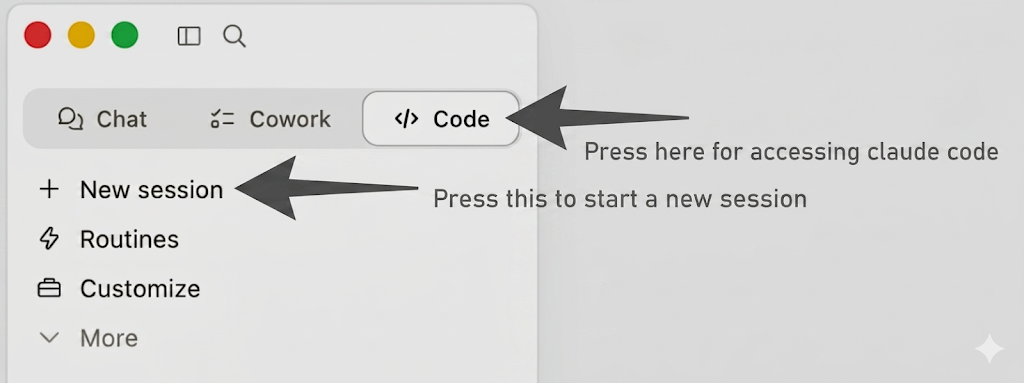 .
.
Experience how easy it is to learn something new; learning is not about the material anymore, it's about knowing what you need to learn.
Let's experience how easy it is to learn!
Prompt:
Explain to me the concept "skill.md", visualise it, I'm in business not in tech, keep
the words simple.
Prompt follow-up:
Now also explain me skills in general, beyond the md
Now let's use Person.md
First, make your own person.md — a five-line file that tells Claude who you are, what you're solving at Prosus, and how you like to be spoken to. Save it next to where you're working.
Start a new Claude Code session.
Prompt:
Read person.md, explain to me skill.md and visualise it.
Stuck?Debrief — what should have happened
Two visualisations of the same concept (a skillSkillA reusable bundle of know-how that Claude loads on demand. Lives as a folder of markdown on your machine; kicks in when the conversation matches what the skill is for.), one generic and one personalised. The generic one is fine. The personalised one is the moment the lesson lands.
The point: you can teach yourself almost anything by writing a one-line prompt and a five-line person.md. Learning stops being about the material and starts being about knowing what to ask.
Stuck?FAQ for this exercise
Q: I got "there is no skills.md" — should we have downloaded a file? My first prompt got a generic answer because there's no skills.md. A: "Skill" is a concept, not a file you need to have. Adjust the prompt to "explain me the concept skill.md" or "this is a concept, not an actual file" and Claude will explain it instead of looking for a file.
Q: Where should the person.md file be? My prompt told me there's no .md file. A: Save it in the folder you're running Claude Code from, with the exact name person.md — that's the path the prompt above expects. If you stored it elsewhere, either move it or update the prompt to point at the real path.
Q: What goes inside a person.md? A: Five lines is plenty: your role, what you're solving at Prosus, how you like to think, how you like to be spoken to. The hidden page walks through it with a John Doe example.
OptionalGo deeper
Pick something you actually don't know how to do — Remotion, FLAMLFLAMLFast and Lightweight AutoML — an open-source Python library from Microsoft Research. Give it a dataset and a metric; it tries model types and hyperparameters and returns the best in a fixed time budget., Whisper, pptxgenjs — and ask Claude to teach it to you with a runnable example:
Teach me Remotion. Make a working five-second video I can render right now,
explain each line, and tell me what to break first to learn it.
The prompt that asks for teaching gets you code, explanation, and a starting point — all together. The agent is your fastest tutor; the bottleneck is just knowing what to ask for.
ReflectInterlude B — Skills as durable memory
You've now used contextContextEverything Claude can see right now — the conversation so far, the files it has read, the tool results, the system instructions. A big text buffer the model reads end-to-end before every reply. in two flavours:
- Loose files (
person.md) — dropped next to a prompt, scoped to that sessionSessionA single ongoing conversation with Claude Code. Every message, every file Claude has read, every tool result lives inside one session — stored locally on your machine.. - Skills (
create-prosus-presentation) — registered with Claude, scoped to a project / your account / a plugin, picked up automatically when the description matches.
The mental model: a loose file is a sticky note on a colleague's desk. A skill is a section in the company handbook. Both are useful. The handbook compounds.
A practical rule: every time you answer the same question twice, write a skill. The third time should be free.