Tone-of-voice email
Write in your own tone of voice
Start a new Claude Code session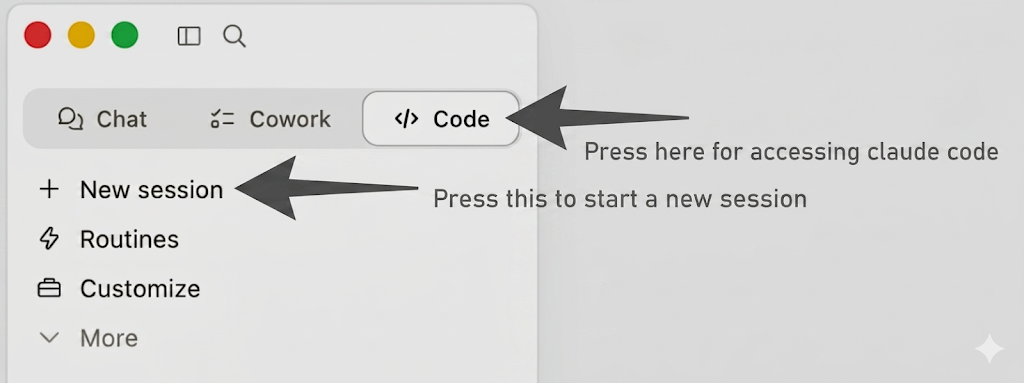 .
.
We all know the term: "This sounds like AI" — we can either see it as a fault, or fix it by giving the agent your own voice. That voice lives in your <name>.md.
Prompt:
Draft me an email in my tone of voice using <name>.md
The message I want to transmit is:
The way companies are organized is about to change forever.
Not incrementally. Fundamentally.
We're moving from hierarchical org charts — divided by departments, full of approval bottlenecks — toward something completely different: intelligent, process-oriented organisations, where agentic workflows run bounded loops between human checkpoints.
This isn't a productivity improvement. It's a rethink of the entire structure.
Output to me directly so I can verify it here, do not make a real draft
Then ask yourself:
Is this mail something you would write?
Stuck?Debrief — what should have happened
A draft that sounds plausibly like you, not generic. Note the deliberate guardrail in the prompt: output to me directly, do not make a real draft. That's important — never let an agent send something on your behalf without you reading it first. Prompt injection from upstream content (the email you're replying to, the doc you're summarising) is a real attack surface. Verify before send.
Stuck?FAQ for this exercise
Q: How well does this generalise? Could I draft a Slack message, a memo, a LinkedIn post the same way? A: Yes — same pattern. The <name>.md is the voice; the prompt is the message. The trick is keeping the voice file rich (3–5 paragraphs of how you actually write).
Q: Is there a concern about confidentiality if Claude reads my emails? A: We're on an enterprise account so Anthropic doesn't save the data or use it for training — same trust level as Gmail or Dropbox holding your data. AI sounds scarier but it's the same kind of cloud database underneath.
OptionalGo deeper
Reverse the exercise. Download a colleague's person.md, then:
Read <colleague>.md. Draft an email FROM them TO me, in their voice,
summarising what they'd most want me to know about their week.
Output to me directly, do not make a real draft.
The same machinery in mirror — voice flows from the file in either direction. Useful when you're prepping for a 1:1 and want to imagine what the other side sounds like before they say it.